Top 5 Image Retouching Apps for Google Play: Elevate Your Photos from Snapshots to Showstoppers
0
(0)
In today’s social media-driven world, capturing stunning visuals is more important than ever. But let’s be honest, not every photo comes out picture-perfect straight from the camera. That’s where image retouching apps come in, transforming your ordinary snaps into envy-worthy masterpieces. With a plethora of options available on Google Play, choosing the right app can feel overwhelming. Fear not, fellow photo enthusiasts! We’ve compiled a comprehensive guide to the best image retouching apps, each catering to different needs and skill levels. Some of them are even free. Buckle up and get ready to unleash your inner editing pro!
Snapseed, hailing from the tech giant Google, is a versatile image editing powerhouse that caters to both beginners and seasoned photographers. Its intuitive interface makes it easy to navigate, even for those with limited editing experience. But don’t let its simplicity fool you. Snapseed packs a punch with an extensive toolkit that includes:
A vast library of filters: From classic vintage styles to trendy modern effects, Snapseed has something for every mood and aesthetic.
Precise adjustments: Fine-tune exposure, white balance, curves, and more for pixel-perfect control.
Selective editing: Target specific areas of your photo with tools like the healing brush, cloning stamp, and selective adjustments, allowing you to meticulously refine details without affecting the entire image.
The name itself speaks volumes – Adobe Photoshop Express is the mobile version of the industry-standard editing software, known for its professional-grade features. While it may have a slightly steeper learning curve compared to Snapseed, the results you can achieve are truly impressive. Here’s what awaits you:
Precise control: Dive deep into adjustments like exposure, white balance, clarity, and shadows/highlights, wielding granular control over your photo’s mood and tone.
Noise reduction and sharpening: Eliminate unwanted noise and sharpen blurry details for crisp, professional-looking images.
Spot healing and selective edits: Remove unwanted blemishes or objects with pinpoint accuracy, and apply targeted adjustments to specific areas for a polished look.
Calling all selfie enthusiasts and portrait photographers! AirBrush is your one-stop shop for achieving flawless, magazine-worthy portraits. This app specializes in skin retouching, blemish removal, and beauty filters, offering a range of tools to help you achieve your desired look:
Smooth operator: Say goodbye to blemishes, wrinkles, and imperfections with AirBrush’s skin smoothing and softening tools. Achieve a natural-looking, radiant complexion.
Feature finesse: Reshape and contour facial features for a more symmetrical or sculpted look. Brighten eyes, whiten teeth, and even experiment with virtual makeup and hair color changes.
Artistic flair: Blur the background or add bokeh effects for a dreamy, professional touch to your portraits.
PicsArt isn’t just for retouching; it’s a creative playground for all things photo editing. While it offers a comprehensive set of retouching tools like blemish removal, red-eye correction, and adjustments, PicsArt truly shines in its creative features:
Collage maker: Create stunning collages with various layouts, frames, and stickers, letting your imagination run wild.
Artistic filters and effects: Explore a vast library of artistic filters, light leaks, and overlays to transform your photos into unique works of art.
Draw and add text: Unleash your inner artist by drawing directly on your photos or adding text with customizable fonts and colors.
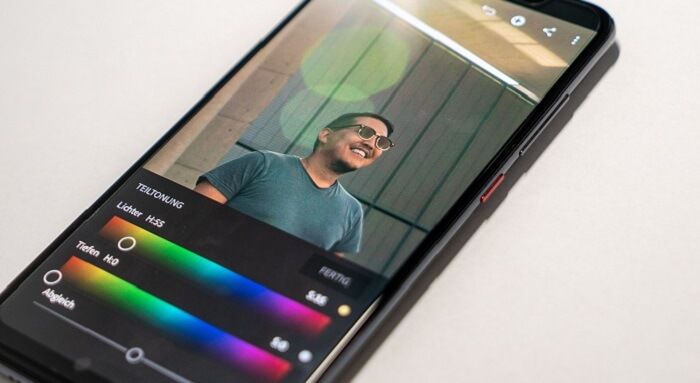
VSCO has built a loyal following among photographers who appreciate the subtle yet impactful power of color grading. This app isn’t just about slapping on a filter; it’s about understanding how colors interact and using them to create specific moods and atmospheres in your photos:
Premium film presets: VSCO’s signature film presets emulate the look and feel of classic analog films, offering a nostalgic and timeless aesthetic.
Advanced color editing tools: Fine-tune specific colors, adjust white balance, and experiment with split toning for nuanced color control.
Community and inspiration: Connect with a vibrant community of photographers and designers